Withdraw guide
Withdraw funds from your DEX accounts to any Arbitrum wallet address within 2-5 minutes.
How to withdraw
Step 1: Open withdraw modal
Click the Withdraw button in the Portfolio page header.
Step 2: Select source DEX
Choose which DEX to withdraw from:
- Hyperliquid: USDC to Arbitrum
- Aster: USDT to Arbitrum
- Lighter: USDC to Arbitrum
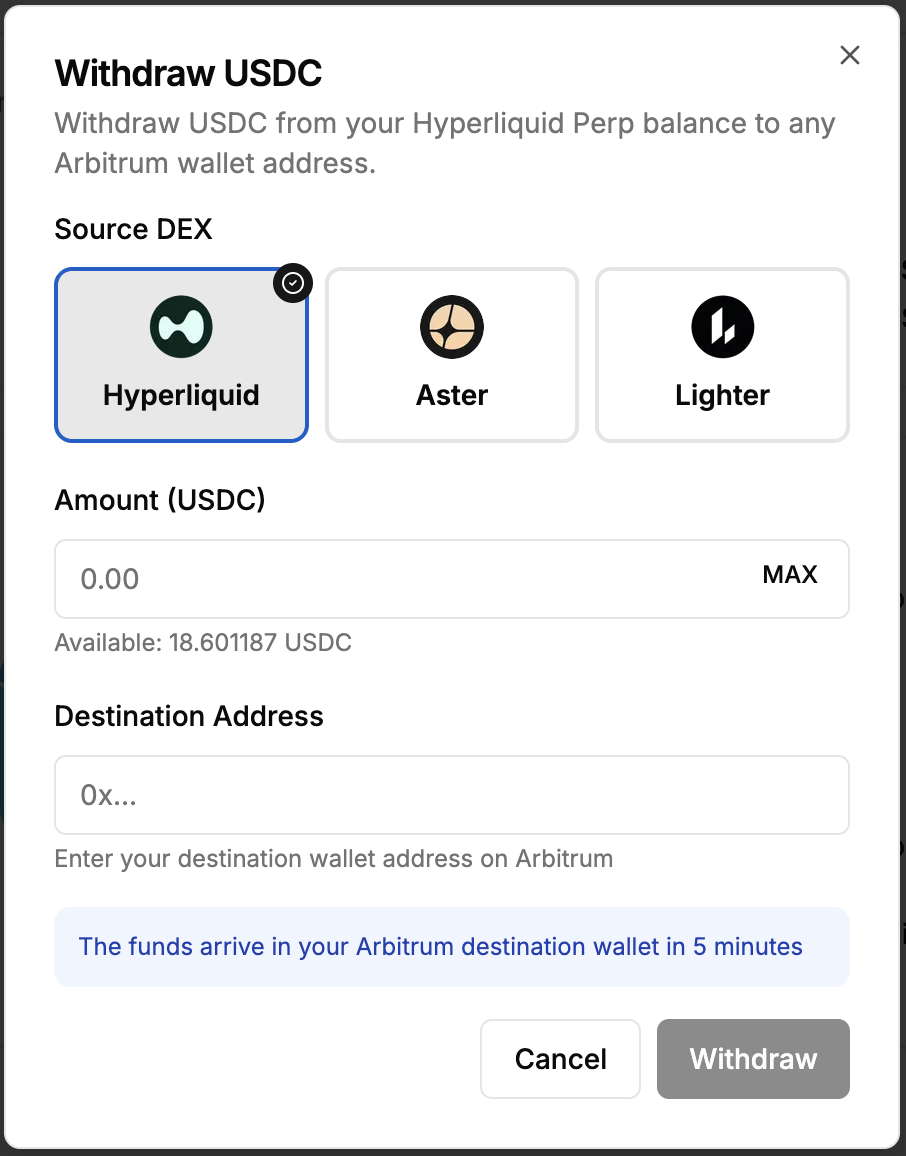
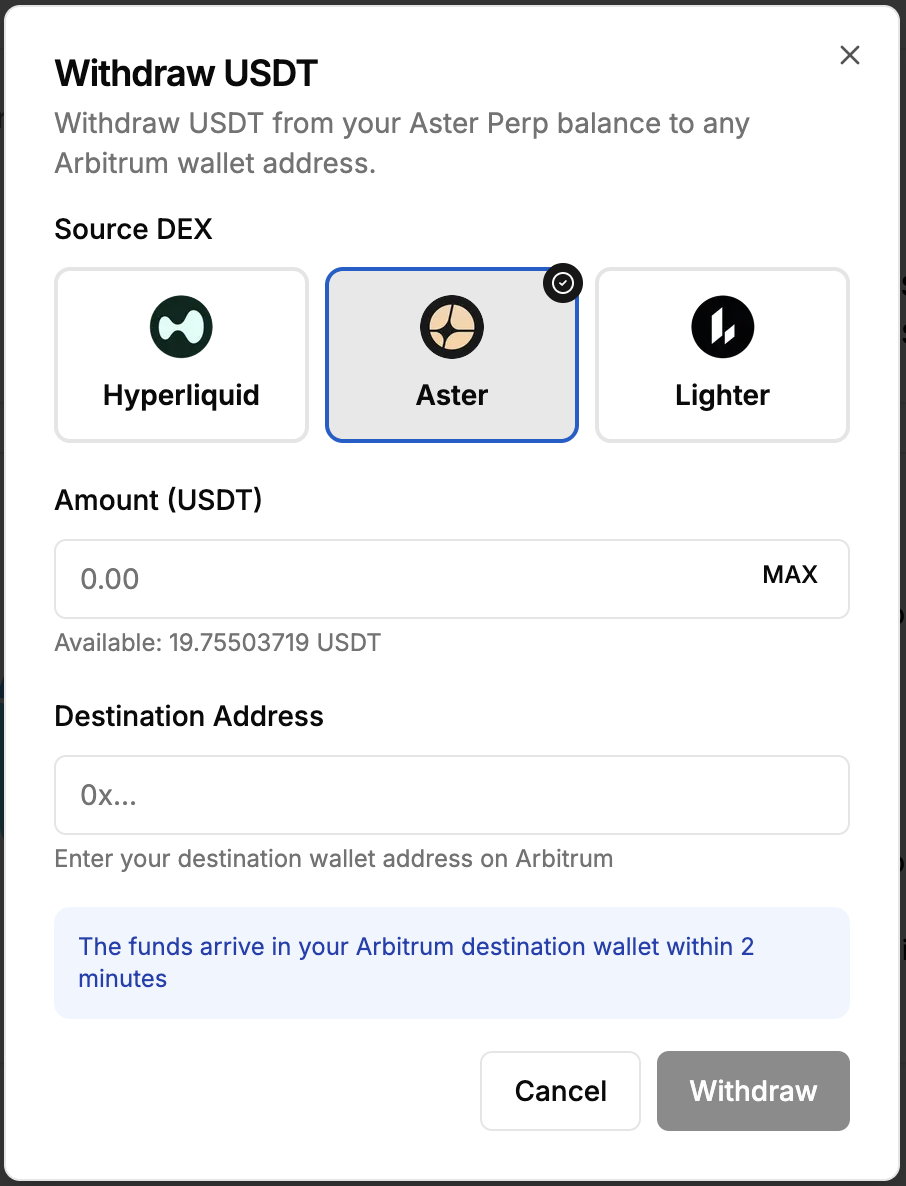
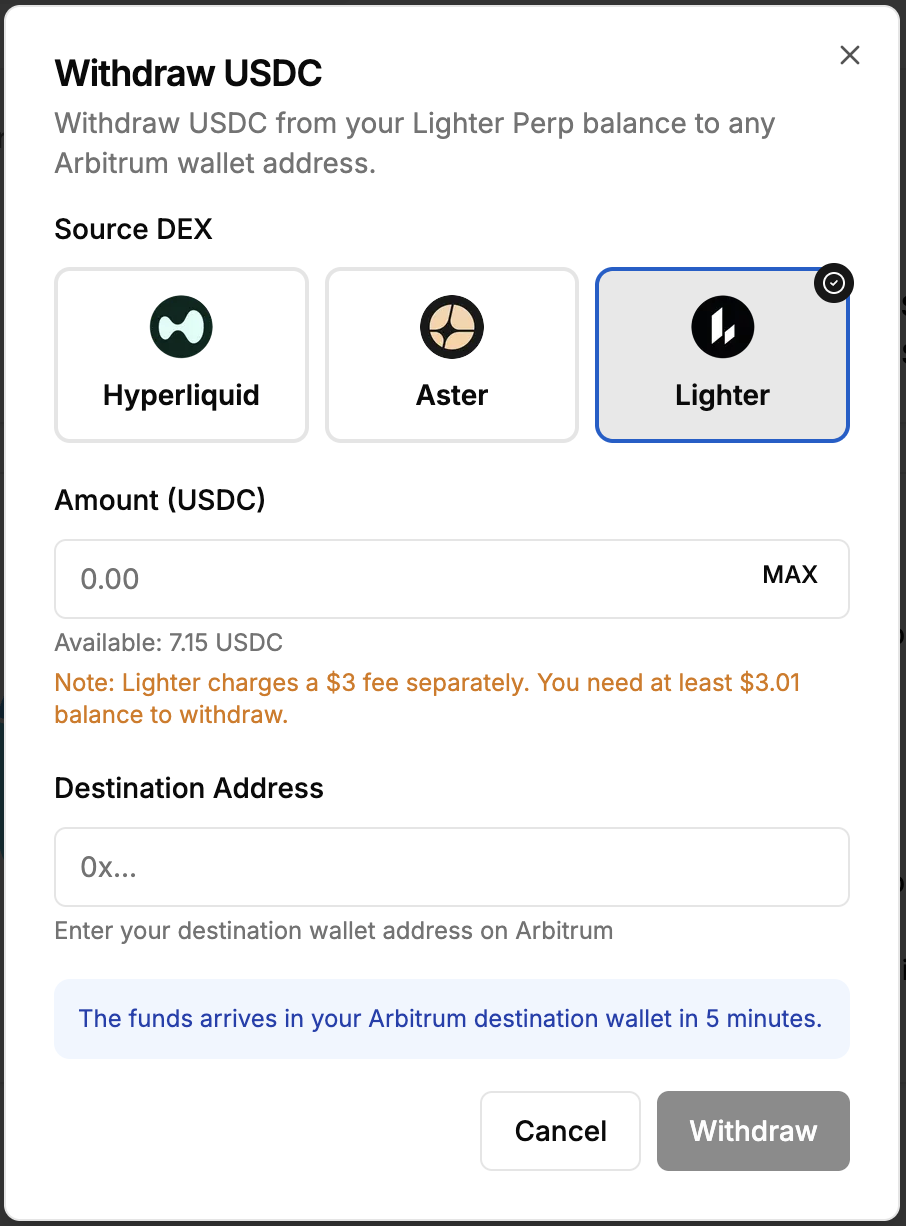
Step 3: Enter amount
Enter the amount to withdraw. Your available balance is displayed below the input field.
Minimum Amounts:
- Hyperliquid: 1.01 USDC (includes 1 USDC withdrawal fee)
- Aster: 0.51 USDT (includes 0.5 USDT withdrawal fee)
- Lighter: 0.01 USDC (3 USDC fee charged separately from balance)
Click MAX to withdraw your entire available balance.
Step 4: Enter destination address
Enter the Arbitrum wallet address where you want to receive funds.
Important: Cannot withdraw to your own AI wallet address. This would trigger automatic re-deposit. Use a different external wallet address.
Step 5: Submit withdrawal
Click Withdraw to submit the request. The system processes your withdrawal and sends funds to your destination address.
Processing Time:
- Hyperliquid: 5 minutes
- Aster: 2 minutes
- Lighter: 5 minutes
Step 6: Track status
The modal shows withdrawal status:
- Processing: Withdrawal is being executed
- Completed: Funds sent to destination address
- Failed: Withdrawal failed (error message shown)
You can close the modal and the withdrawal continues in the background.
Withdrawal methods by DEX
Hyperliquid withdrawals
Token: USDC
Destination: Arbitrum
Fee: 1 USDC (charged by Hyperliquid)
Process: The system calls Hyperliquid's withdrawal function with your signature. Funds are sent from Hyperliquid to your destination address on Arbitrum.
Time: 5 minutes
Requirements: Sufficient balance (minimum 1.01 USDC)
Aster withdrawals
Token: USDT
Destination: Arbitrum
Fee: 0.5 USDT (charged by Aster)
Process: Uses Aster's API with HMAC signature and EIP-712 user signature. Funds are withdrawn to your destination address. If you specify a custom address, funds are automatically forwarded within 2 minutes.
Time: 2 minutes
Requirements: Sufficient balance (minimum 0.51 USDT)
Lighter withdrawals
Token: USDC
Destination: Arbitrum
Fee: 3 USDC (charged separately from your balance)
Process: Uses Lighter's fast withdraw pool. The system signs the transfer transaction with L2 signature and L1 signature (user wallet), then submits to Lighter's fast withdraw endpoint.
Time: 5 minutes
Requirements: Sufficient balance (minimum 3.01 USDC to cover withdrawal + fee)
Note: Lighter charges the 3 USDC fee separately from your withdrawal amount. You need at least 3.01 USDC balance to withdraw any amount.
Important notes
Destination Address: Must be a valid Ethereum address on Arbitrum. Cannot be your own AI wallet address.
Withdrawal Fees: Fees are charged by the DEX, not B3X. Hyperliquid: 1 USDC, Aster: 0.5 USDT, Lighter: 3 USDC.
Minimum Balance: Ensure you have sufficient balance to cover both the withdrawal amount and the fee.
Processing Time: Withdrawals typically complete within the stated time. Network congestion may cause delays.
Transaction Hash: Once completed, you can view the transaction on Arbiscan using the provided transaction hash.
Withdrawal limits
Hyperliquid:
- Minimum: 1.01 USDC
- Maximum: Your available balance
Aster:
- Minimum: 0.51 USDT
- Maximum: Your available balance
Lighter:
- Minimum: 0.01 USDC
- Maximum: Your available balance minus 3 USDC fee
- Required Balance: At least 3.01 USDC
Troubleshooting
Withdrawal Failed: Check error message for details. Common issues include insufficient balance or invalid destination address.
Insufficient Balance: Ensure you have enough to cover both withdrawal amount and fee. For Lighter, you need at least 3.01 USDC.
Invalid Address: Destination address must be a valid Ethereum address starting with 0x. Cannot be your own AI wallet address.
Withdrawal Stuck: Wait up to 10 minutes. If still processing, contact support with your withdrawal ID.
Withdrawal history
View your withdrawal history in the Portfolio page. Each withdrawal shows:
- Amount and token
- Source DEX
- Destination address
- Status (pending, completed, failed)
- Transaction hash (when completed)
- Timestamp
Support
Need help with withdrawals?
- Discord: discord.gg/Fz7aDWkp
- GitHub: github.com/b3x-ai