AI chat trading basics
B3X AI Navigator's chat interface allows you to trade using natural language commands. The AI agent understands your intent, executes trades, and manages your portfolio across multiple DEXs—all through conversation.
Getting started with AI chat
Prerequisites
Before using AI chat trading:
- ✅ Account setup completed
- ✅ Backend signing authority delegated
- ✅ Funds deposited to at least one DEX
Accessing the chat interface
- Navigate to the Chat page from the sidebar
- The chat interface opens with a welcome screen
- Start typing your trading commands in the input field
Understanding the chat interface
DEX selector
Located in the bottom-right of the chat input, the DEX Selector lets you choose which exchange to trade on.
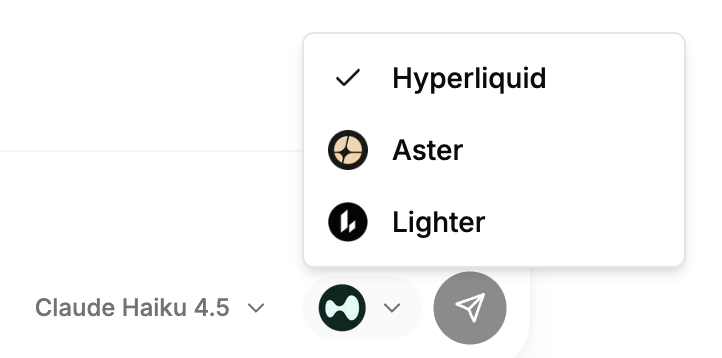
Available DEXs:
- Hyperliquid - Deep liquidity, competitive fees
- Aster - Advanced perpetual trading
- Lighter - Zero-fee trading
How to Use:
- Click the DEX logo icon in the chat input
- Select your preferred DEX from the dropdown
- The selected DEX will be used for your next trade
The AI agent will use your selected DEX for all trading commands unless you explicitly specify a different DEX in your message (e.g., "Buy BTC on Aster").
AI model selector
Located next to the DEX selector, the Model Selector lets you choose which AI model powers your trading assistant.
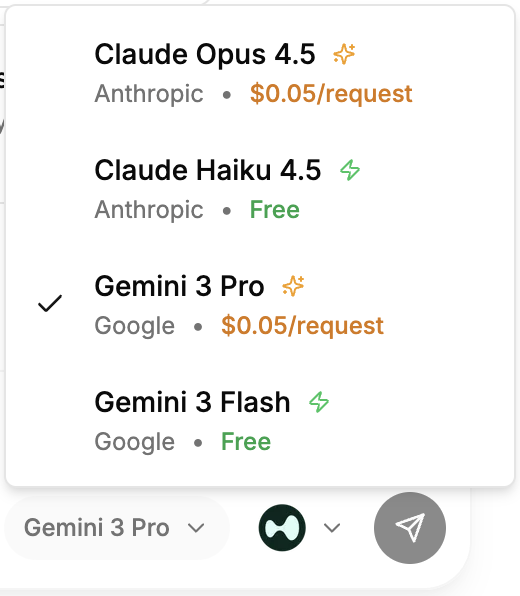
Available Models:
Anthropic:
- Claude Opus 4.5 - Most capable, best for complex strategies
- Claude Haiku 4.5 - Fast and efficient (default)
Google:
- Gemini 3 Pro - Advanced reasoning
- Gemini 3 Flash - Ultra-fast responses
How to Use:
- Click the model name in the chat input
- Select your preferred AI model
- The model processes all subsequent messages
- Fast Models (Claude Haiku 4.5, Gemini 3 Flash): Free to use, optimized for speed
- Advanced Reasoning Models (Claude Opus 4.5, Gemini 3 Pro): Superior reasoning for complex strategies, requires additional fee per request
- Model selection persists for your session
Note: Advanced Reasoning AI Models incur extra fees. See Advanced AI Model Fees for pricing details.
Chat input field
The main text area where you type your commands and questions.
Features:
- Auto-resize: Expands as you type (max 200px height)
- Enter to send: Press Enter to send message
- Shift+Enter: Add new line without sending
- Placeholder text: Shows helpful hints when empty
States:
- Enabled: Green send button, ready to accept commands
- Disabled: Grayed out when backend authorization is required
How AI chat trading works
1. Natural language processing
The AI agent understands natural language commands:
Buy 0.1 BTC with 5x leverage
The AI interprets:
- Action: Buy (open long position)
- Asset: BTC
- Size: 0.1 BTC
- Leverage: 5x
- DEX: Currently selected DEX
2. Order confirmation
Before executing any trade, the AI always asks for confirmation with an order summary showing asset, size, leverage, estimated entry, margin requirements, and liquidation price.
Type yes, confirm, or proceed to execute.
For complete order confirmation examples and workflows, see Trading Commands - Order Confirmation Flow.
3. Trade execution
The AI agent sets leverage (if specified), calculates fees and margin requirements, places the order on the selected DEX, and reports execution results with order ID and position details.
Basic commands
Trading commands
Open Position:
Long 0.1 BTC with 5x leverage
Short 1 ETH with 3x leverage
Buy 0.5 SOL on Hyperliquid
Close Position:
Close my BTC position
Close all my positions
Exit my ETH long
Set Stop-Loss/Take-Profit:
Set stop-loss for my BTC position at $42,000
Set take-profit for my ETH position at $2,500
Set TP at $45,000 and SL at $41,000 for BTC
Information commands
Check Balance:
What's my balance?
Show my balance on Hyperliquid
How much USDC do I have?
View Positions:
Show my positions
What positions do I have open?
Show my Aster positions
Market Data:
What's the BTC price?
Show me ETH order book
Get SOL funding rate
Conversation features
Context awareness
The AI remembers your conversation context:
You: What's my BTC position?
AI: [Shows BTC position details]

You: Close it
AI: [Understands "it" refers to BTC position]
Multi-turn interactions
The AI handles complex multi-step workflows:
You: I want to open a BTC long
AI: Sure! What size and leverage would you like?

You: 0.1 BTC with 5x leverage
AI: [Shows order summary and asks for confirmation]

You: Yes
AI: [Executes trade]
Error handling
The AI provides helpful guidance when issues occur:
You: Buy 10 BTC
AI: Insufficient balance. You have 100 USDC available, but this
    order requires ~$432,500. Would you like to:
    1. Reduce position size
    2. Use higher leverage
    3. Deposit more funds
Trading safety features
1. Mandatory confirmation
Every trade requires explicit confirmation. The AI never executes without your approval.
2. Order validation
The AI validates orders before submission:
- Sufficient balance check
- Leverage limits verification
- Symbol validity confirmation
- Margin requirement calculation
3. Risk warnings
The AI warns about high-risk actions:
- High leverage (>10x)
- Large position sizes
- Liquidation price proximity
- Insufficient margin
4. Position monitoring
The AI tracks your positions and can alert you to:
- Unrealized PnL changes
- Liquidation risk
- Open orders status
Spot trading
In addition to perpetual futures, you can trade spot markets using natural language:
Spot Trading Commands:
Buy 10 HYPE with USDC
Swap 50 USDC for PURR
Sell all my HYPE tokens
How It Works:
- AI detects spot market symbols (HYPE, PURR, etc.)
- Executes spot trade on the appropriate DEX
- No leverage involved (1x only)
- Actual token ownership (not contracts)
Supported Spot Markets:
- Hyperliquid: HYPE/USDC, PURR/USDC, and other native tokens
- Aster: BTCUSDT, ETHUSDT spot pairs
- Lighter: ETH/USDC, BTC/USDC spot pairs
The AI automatically determines whether you're trading spot or perpetual based on:
- Symbol format (HYPE = spot, BTC = perp)
- Command context ("buy tokens" vs "long position")
- Market availability on selected DEX
Tips for effective AI chat trading
1. Be specific
Good:
Long 0.1 BTC on Hyperliquid with 5x leverage
Too Vague:
Buy some BTC
2. Use natural language
The AI understands conversational commands:
I want to go long on ETH with 3x leverage, size 0.5
3. Specify DEX when needed
If trading on a different DEX than selected:
Buy 0.1 BTC on Aster
4. Ask questions first
Check information before trading:
What's my balance?
What's the current BTC price?
Show my open positions
5. Use abbreviations
The AI understands common abbreviations:
TP = Take-Profit
SL = Stop-Loss
PnL = Profit and Loss
Limitations and considerations
What AI chat can do
✅ Execute perpetual and spot trades ✅ Manage positions (open, close, modify) ✅ Set stop-loss and take-profit orders ✅ Query market data and portfolio information ✅ Calculate fees and margin requirements ✅ Provide trading insights and analysis
What AI chat cannot do
❌ Execute trades without confirmation ❌ Override DEX-specific limitations ❌ Guarantee trade execution (market conditions apply) ❌ Provide financial advice or predictions ❌ Access external wallets or accounts
Important notes
- Confirmation Required: All trades require explicit confirmation
- DEX Availability: Some features vary by DEX
- Market Conditions: Orders may fail due to liquidity or network issues
- API Key Setup: Aster and Lighter require initial deposit for API key generation
- Gasless Trading: All trading is gasless—no network fees for transactions
Next steps
Now that you understand the basics, explore more advanced features:
- Market Data Commands - Query prices, order books, and funding rates
- Trading Commands - Master all trading operations
- Portfolio Commands - Manage your positions and orders
- Multi-DEX Strategies - Trade across multiple exchanges
- Trading Signals - Generate AI-powered trading signals
Support
Need help with AI chat trading?
- Discord: discord.gg/Fz7aDWkp
- GitHub: github.com/b3x-ai