Fees and costs overview
Understand all fees associated with using B3X AI Agent for trading across multiple DEXs.
Fee structure
B3X charges trading fees only on Hyperliquid trades. No trading fees are charged for Aster or Lighter trades.
Trading Fees (Hyperliquid Only):
- Fixed Fee: $0.01 USDC per order
- Variable Fee: 0.05% of order value (notional value)
- Total Fee: $0.01 + (Order Value × 0.05%)
DEX Trading Fees:
- Each DEX charges its own trading fees (maker/taker fees)
- These fees are separate from B3X trading fees
- Refer to each DEX's documentation for their fee schedules
Withdrawal Fees:
- Hyperliquid: 1 USDC
- Aster: 0.5 USDT
- Lighter: 3 USDC
AI Model Fees:
- Flash Models: Free (Claude Haiku 4.5, Gemini 3 Flash)
- Advanced Models: $0.20 USDC per request (Claude Opus 4.5, Gemini 3 Pro)
No Fees For:
- Deposits (automatic, no fees)
- Internal transfers between Spot and Perp accounts (free and instant)
- Aster and Lighter trades (no B3X trading fees)
- Copy trading setup and management (no additional fees beyond trading fees)
- Flash AI models (free unlimited usage)
When fees are charged
Trading Fees:
- Charged when placing orders on Hyperliquid
- Applied to both manual trades and copy trades
- Not charged on reduce-only orders
- Automatically deducted from your Hyperliquid perp balance
DEX Fees:
- Charged by the DEX when your order is filled
- Applied to all trades on all DEXs
- Included in the execution price you see
Withdrawal Fees:
- Charged when withdrawing funds from a DEX to your Arbitrum wallet
- Deducted from the withdrawal amount
Fee transparency
All fees are clearly displayed:
- Trading fees shown before order confirmation
- DEX fees reflected in execution prices
- Withdrawal fees displayed in the withdraw modal
- AI model fees shown before each request
Track your fee history
View all your fee payments on the Statistics page:
- Complete history of B3X trading fees
- AI model usage fees
- Breakdown by date and transaction type
- Total fees paid over time
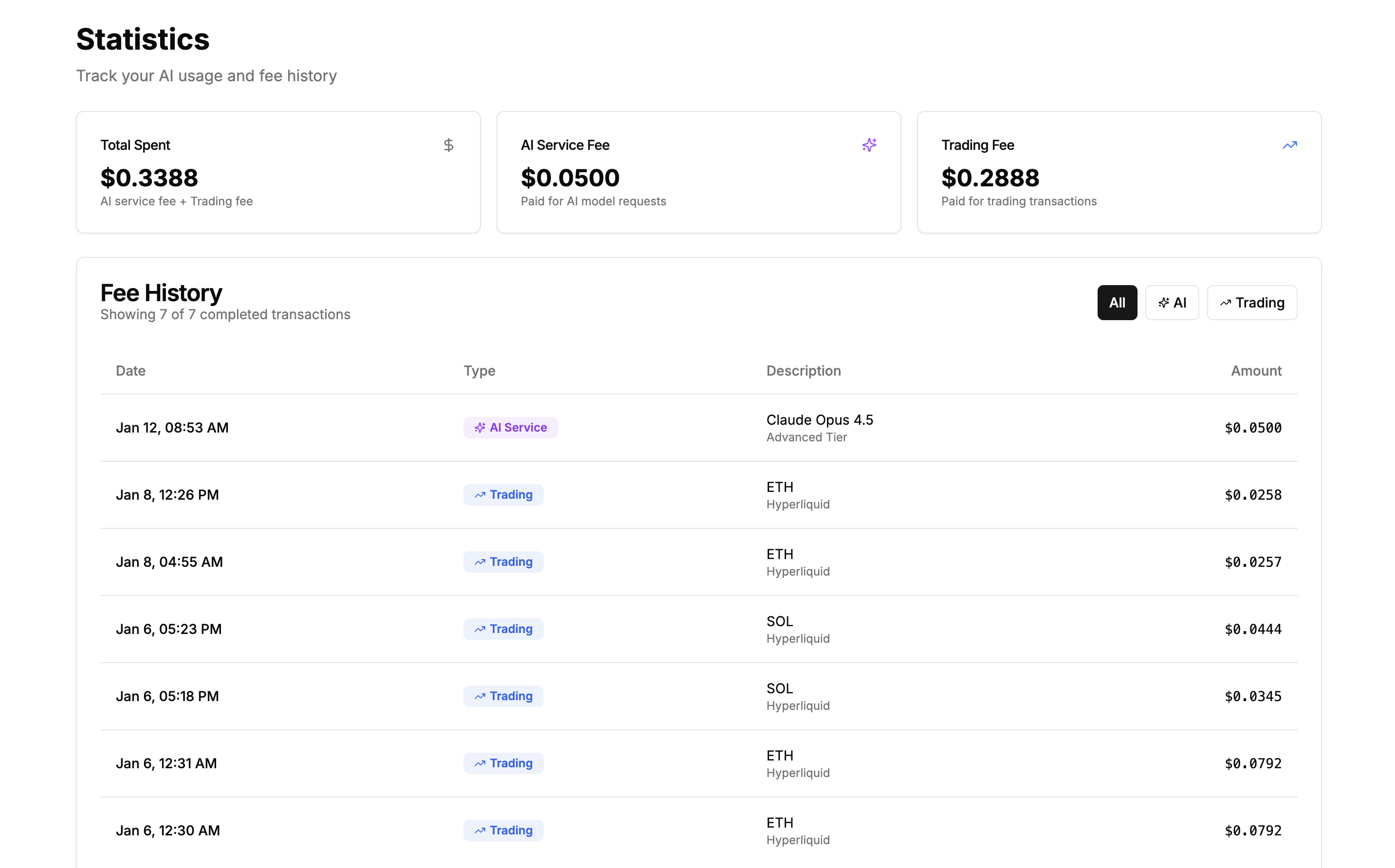
Navigate to Statistics from the sidebar to monitor your fee spending.
Next steps
- Trading Fees - Detailed breakdown of B3X trading fees
- Advanced AI Model Fees - Information about Flash and Advanced AI models
Support
Questions about fees?
- Discord: discord.gg/Fz7aDWkp
- GitHub: github.com/b3x-ai