Portfolio dashboard
View your trading portfolio across Hyperliquid, Aster, and Lighter with real-time balances, positions, and open orders.
Page layout
The Portfolio page has four tabs at the top:
- Overview: Combined view of all DEXs
- Hyperliquid: Hyperliquid-only data
- Aster: Aster-only data (requires API key)
- Lighter: Lighter-only data (requires API key)
Three action buttons in the top right:
- Deposit: Add funds to your accounts
- Withdraw: Remove funds from your accounts
- Perps ⇄ Spot: Transfer between perpetual and spot accounts
Overview tab
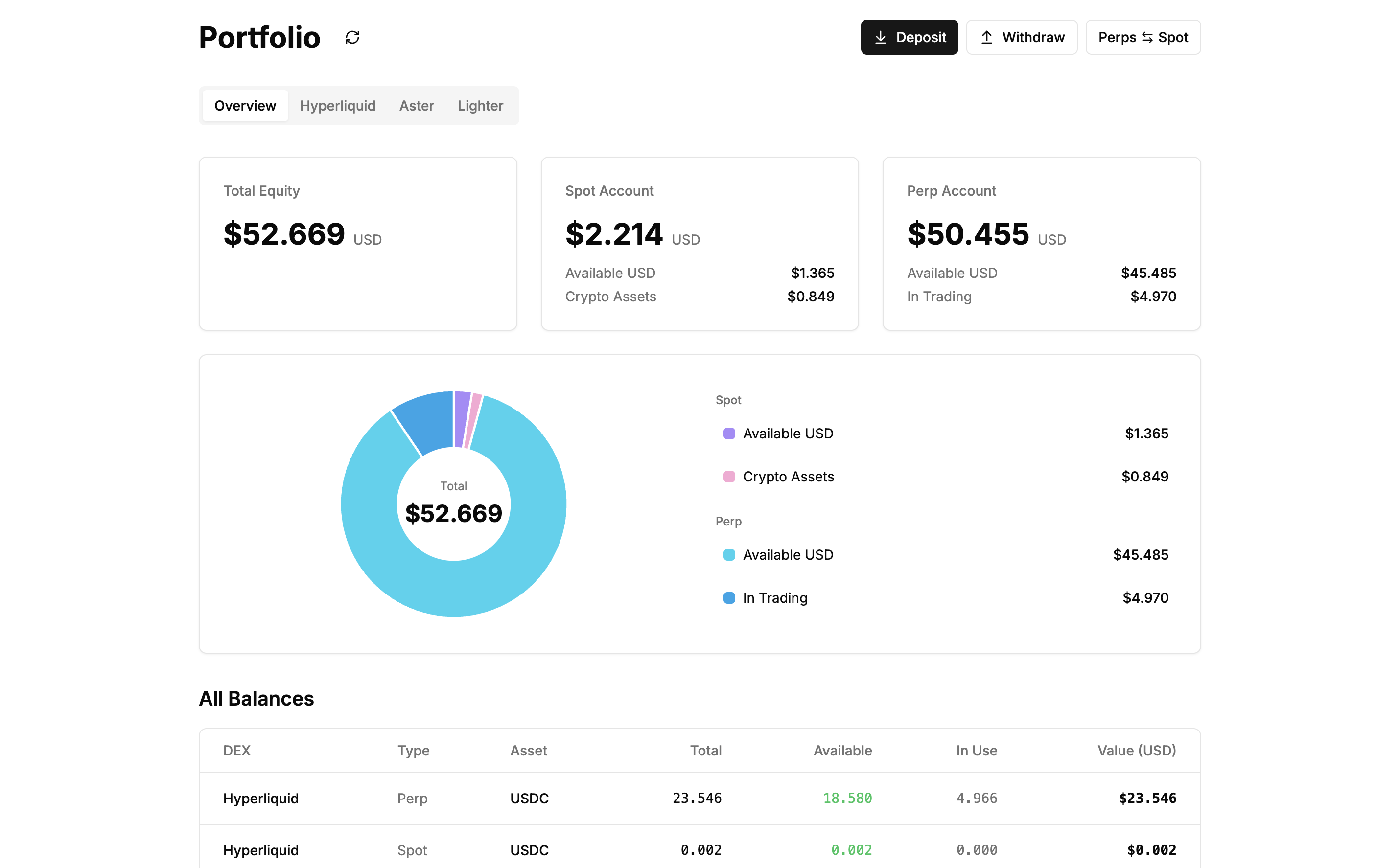
Summary cards
Three cards display your portfolio totals:
Total Equity
- Shows combined value across all accounts and DEXs
- Displayed in USD
Spot Account
- Total spot balance across all DEXs
- Shows Available USD (stablecoins) and Crypto Assets (other tokens) breakdown
Perp Account
- Total perpetual account balance across all DEXs
- Shows Available USD (free margin) and In Trading (locked in positions/orders) breakdown
Portfolio breakdown chart
A donut chart shows your portfolio allocation with the total value in the center. The legend on the right lists:
Spot:
- Available USD
- Crypto Assets
Perp:
- Available USD
- In Trading
Each segment shows the USD value.
All balances table
Shows balances from all DEXs with columns:
- DEX: Platform name (Hyperliquid, Aster, Lighter)
- Type: Perp or Spot
- Asset: Token symbol (USDC, USDT, ETH, HYPE, LIT)
- Total: Total balance
- Available: Available to trade or withdraw (green text)
- In Use: Locked in orders or positions
- Value (USD): USD equivalent
All positions table
Shows open positions from all DEXs with columns:
- DEX: Platform name
- Market: Trading pair (e.g., ETH)
- Leverage: Position leverage (e.g., 5x)
- Side: LONG (green) or SHORT (red)
- Size: Position size
- Entry Price: Average entry price
- Mark Price: Current market price
- Liq. Price: Liquidation price (orange text)
- PnL: Unrealized profit/loss (green for profit, red for loss)
All open orders table
Shows pending orders from all DEXs with columns:
- DEX: Platform name
- Symbol: Trading pair
- Side: Buy or Sell
- Size: Order quantity
- Price: Limit price
- Type: Order type
- Time: When order was placed
DEX-specific tabs
Click Hyperliquid, Aster, or Lighter tabs to view data for a single DEX. The layout is the same as the Overview tab but filtered to show only that DEX's data.
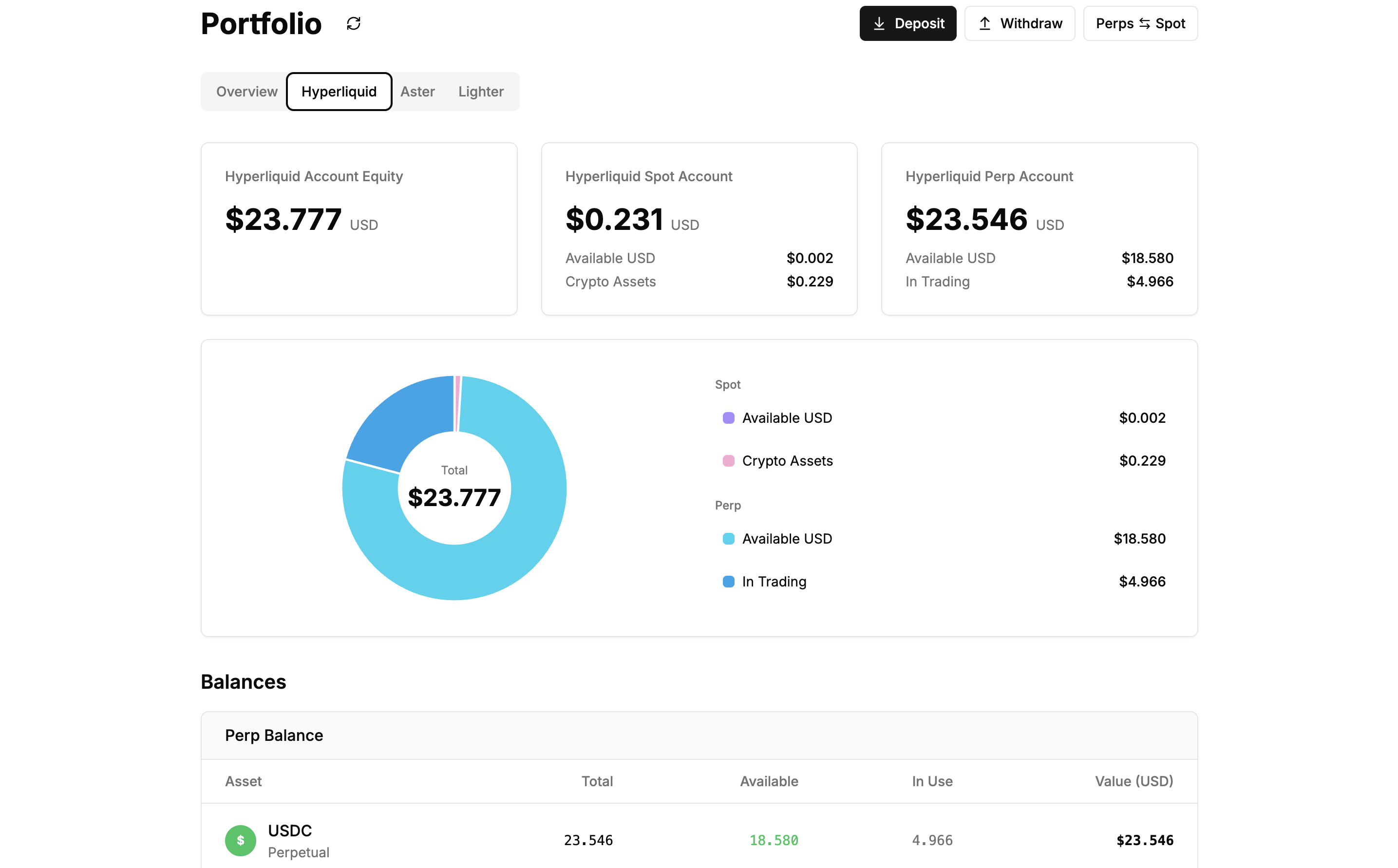
Note: Aster and Lighter require API keys configured in Settings to display data.
Action buttons
Deposit Opens a modal to deposit funds into your DEX accounts from other chains.
Withdraw
Opens a modal to withdraw funds from your DEX accounts to other chains.
Perps ⇄ Spot Opens a modal to transfer funds between your perpetual and spot accounts on the same DEX.
Understanding the data
Available (green text): Funds you can trade with or withdraw
In Use: Funds locked in open orders or positions
Liq. Price (orange text): Price at which your position will be liquidated
PnL: Unrealized profit (green) or loss (red) on open positions
Support
Need help with your portfolio?
- Discord: discord.gg/Fz7aDWkp
- GitHub: github.com/b3x-ai