Copy trading configuration
Set up your copy trading configuration to automatically replicate a trader's positions with customized risk parameters and position sizing.
Prerequisites
- Account setup completed with backend signing authority delegated
- Funds deposited to your chosen execution DEX
- Trader address identified (from Finding Traders)
Creating a configuration
Click Copy button next to a trader on the leaderboard, or click Create Configuration and enter the trader address manually.
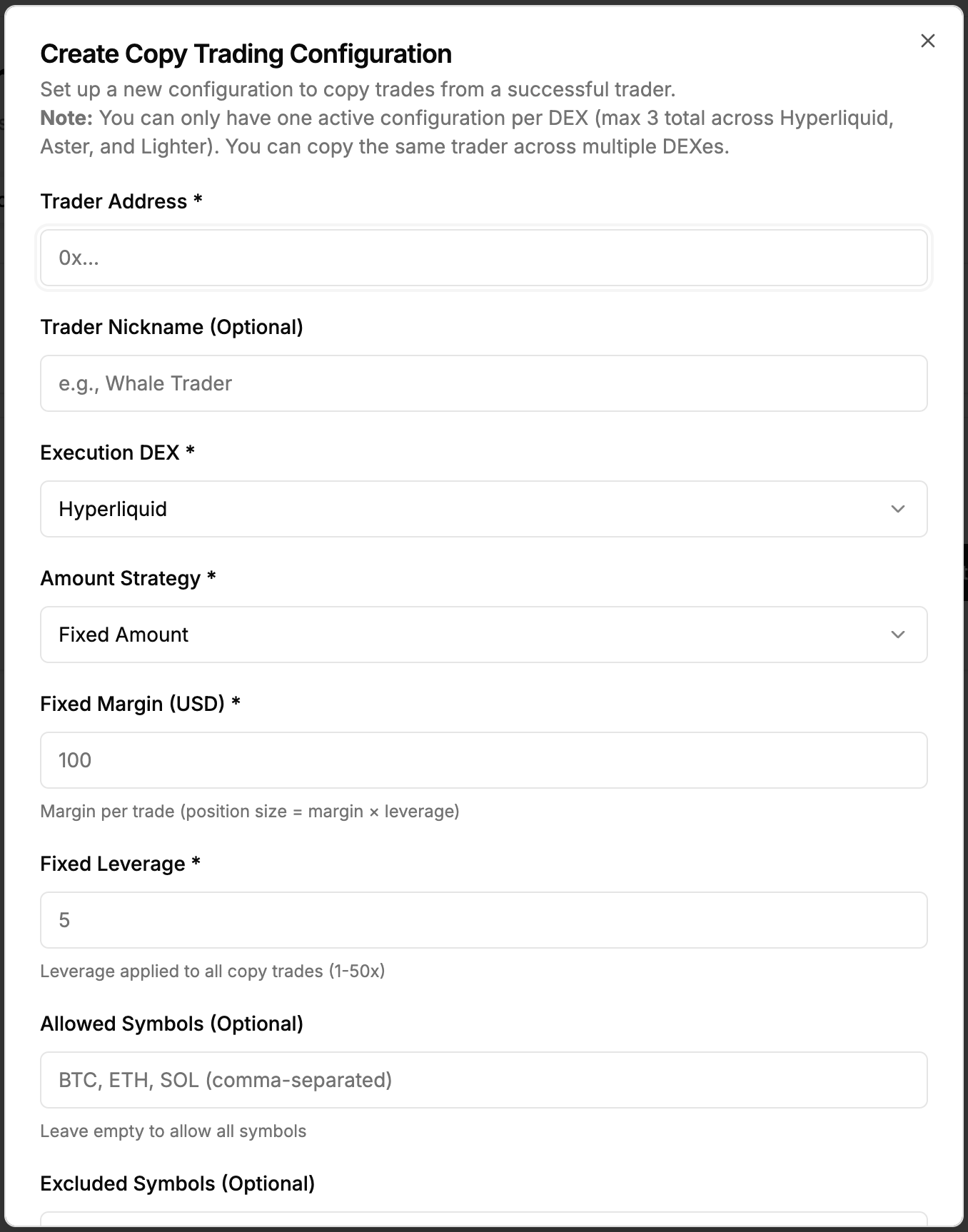
Configuration parameters
Trader Address (Required): Hyperliquid wallet address of the trader to copy.
Trader Nickname (Optional): Friendly name to identify this configuration.
Execution DEX
Execution DEX (Required)
Choose which DEX to execute copied trades on:
Hyperliquid:
- Deepest liquidity
- Widest symbol support
- B3X trading fee: $0.01 + 0.05% of order value
Aster:
- Alternative execution venue
- No B3X trading fees (coming soon)
- Requires Aster API key setup
Lighter:
- Zero DEX fees
- No B3X trading fees (coming soon)
- Requires Lighter API key setup
Important: Only one active configuration per execution DEX at a time.
Position sizing strategy
Fixed Amount Strategy: Use a fixed margin amount for every trade.
- Set Fixed Amount (USD) and Leverage (1x-50x)
- Calculation:
Position Size = (Fixed Amount × Leverage) / Asset Price - Use when you want consistent risk per trade
Fixed Ratio Strategy: Copy a percentage of the trader's position size.
- Set Ratio Percentage (0.1%-100%) and Leverage (1x-50x)
- Calculation:
Position Size = Trader Size × (Ratio Percentage / 100) - Use when you want to scale with trader's conviction
Risk controls (optional)
Minimum Trade Size: Skip trades below this USD value (e.g., $50 to filter small trades).
Maximum Trade Size: Skip trades above this USD value (e.g., $5,000 to cap exposure).
Allowed Symbols: Comma-separated list of symbols to copy (e.g., BTC,ETH,SOL). Leave empty to copy all.
Excluded Symbols: Comma-separated list of symbols to never copy (e.g., DOGE,SHIB).
Filter Priority: Excluded symbols checked first, then allowed symbols (if specified).
Leverage (Required, 1x-50x)
Your fixed leverage for all copied trades, independent of the trader's leverage.
- Conservative (1x-3x): Lower risk, suitable for beginners
- Moderate (3x-10x): Balanced risk/reward
- Aggressive (10x-50x): High risk, requires careful monitoring
Note: System uses the lower of your configured leverage or the DEX's maximum for each symbol.
Example configuration
Conservative BTC/ETH Strategy:
- Execution DEX: Hyperliquid
- Fixed Amount: $200, Leverage: 5x
- Min/Max Trade Size: $100 / $2,000
- Allowed Symbols: BTC,ETH
Result: Every trade uses $200 margin with 5x leverage, only copies BTC and ETH within size limits.
Activation
New configurations are active by default. The system immediately subscribes to the trader's WebSocket feed and starts copying trades.
One Active Config Per DEX: Only one active configuration per execution DEX at a time to prevent conflicting orders. You can copy different traders on different DEXs simultaneously.
Validation
The system validates:
- Valid Ethereum address for trader
- Positive amounts/ratios for chosen strategy
- Leverage between 1 and 50
- No other active config on the same DEX
- Min trade size ≤ max trade size (if both specified)
After creation, view your configuration in the configurations list and monitor copied trades. See Managing Configurations for details.
Strategy examples
Conservative: $50-$100 fixed, 2x-3x leverage, BTC/ETH only, $50-$500 trade size
Moderate: $200-$500 fixed, 5x-7x leverage, all symbols, $100-$2,000 trade size
Aggressive: 5-10% ratio, 10x-20x leverage, all symbols, $200-$10,000 trade size
Tips
Start Small: Begin with low amounts ($50-$100) and leverage (2x-5x). Monitor for a few days before increasing.
Use Filters: Set allowed/excluded symbols based on your knowledge and risk tolerance. Use min/max trade sizes to control exposure.
Monitor: Watch the first few trades closely and adjust settings as needed.
Next steps
Configuration created successfully?
- Manage Configurations - Monitor and control your copy trading
- Best Practices - Optimize your strategy
- Overview - Review copy trading fundamentals
Support
Need help with configuration?
- Discord: discord.gg/Fz7aDWkp
- GitHub: github.com/b3x-ai